


17.7-Inch Display and Google built-in — Why the 2026 Chevrolet Blazer EV Fits Daily Life around Waukegan, IL
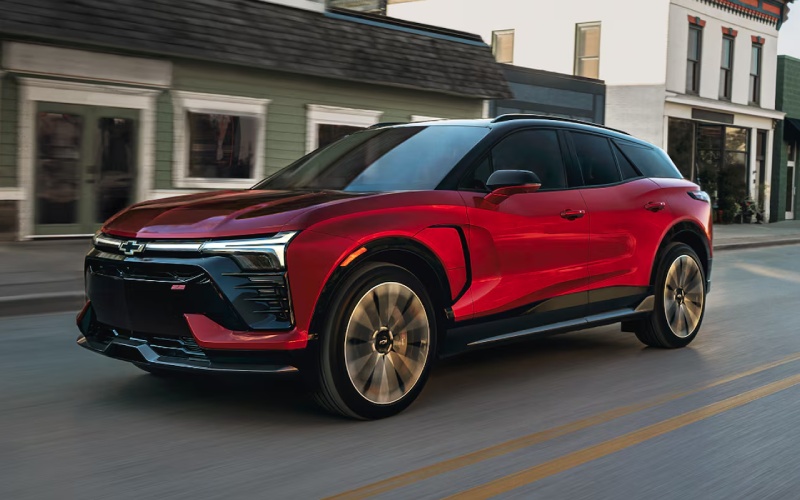
City Chevrolet Of Grayslake – 17.7-Inch Display and Google built-in — Why the 2026 Chevrolet Blazer EV Fits Daily Life around Waukegan, IL
The first time you settle into the 2026 Chevrolet Blazer EV, the cabin’s focal point is impossible to miss: an expansive, best-in-class 17.7-inch standard display that makes everything from route planning to media selection feel immediate and intuitive. Pair it with Google built-in and the whole interface comes to life with natural voice prompts, familiar apps, and seamless navigation. For Waukegan drivers routinely hopping between Sheridan Road, Green Bay Road, and downtown, this duo clears visual clutter and reduces taps so you can focus more on the drive and less on the menu maze.
The big-screen advantage you notice every day
A large display is more than a party trick. The Blazer EV’s 17.7-inch screen lets you see multiple panes at a glance—maps, music, and key vehicle settings—without constant swapping. The map view isn’t cramped, which helps when you are threading through one-way streets or watching for that next turn toward the lakefront. Icons are larger, responsive, and easier to reach, which is especially helpful when you are stationary and customizing preferences. Whether you prefer a minimalist layout or a fuller panel of information, the display adapts so you get clarity without distraction.
That clarity pays dividends for charging, too. When you plan a longer drive, you can visualize your route, review stop options, and monitor energy use in one place. Pair that with the myChevrolet mobile app’s Energy Assist on your phone, and you have both in-vehicle and mobile tools that work together to help simplify drives across Lake County and beyond.
Google built-in that feels natural, not complicated
With Google built-in, the Blazer EV’s infotainment stops feeling like a separate system and starts behaving like the digital tools you already use. Say where you want to go, and natural voice prompts take you there. Search for coffee near Genesee Street or a charger near Grand Avenue, and the results appear clearly on the screen. The voice assistant handles simple tasks like placing calls, changing audio sources, or adjusting settings, which helps minimize touches and mental load during busy stretches of traffic.
What you will also appreciate is the familiarity. If you already rely on Google services, this experience clicks right away—no learning curve, no awkward handoffs. And if you prefer to keep things simple, the menus are clean, and the essentials are easy to find.
One Pedal Driving and regenerative braking, explained
Once you are comfortable with the display and Google built-in, try One Pedal Driving and regenerative braking. With One Pedal Driving enabled, lifting off the accelerator slows the vehicle more assertively, helping you modulate speed through traffic or down to a stop sign. Over time, you will anticipate where to lift, and the effect becomes second nature. Regenerative braking adds a layer of efficiency by converting some of that motion back into energy, which can extend range when used consistently.
A helpful tip for Waukegan commuting: practice One Pedal Driving on familiar streets with predictable signals, like sections of Sheridan Road, before trying it in denser downtown traffic. You will quickly find a rhythm that makes stop-and-go driving smoother and less fatiguing.
Set up for success: quick tips for first drives
- Create a driver profile so your display layout, radio presets, and preferred connections are saved
- Enable Google built-in and sign in to access personalized navigation and voice assistance
- Pair your phone and set up wireless app usage for music, calls, and contacts
- Explore charging info on screen and in the myChevrolet mobile app for route planning
- Toggle One Pedal Driving on a low-traffic route to build muscle memory
If you are coming from a traditional gas SUV, the Blazer EV’s learning curve is shorter than you might expect. The interface is welcoming, not overwhelming, and the core EV tools—like energy displays and charging locators—are there when you need them without getting in the way.
Why the system matters for Waukegan life
Beyond specs and stats, technology should help your routine feel calmer and more efficient. In the Blazer EV, the 17.7-inch display and Google built-in reduce everyday friction. You can glance at larger maps, hear natural voice directions, and make simple changes without sifting through submenus. That shows up in the little moments—adjusting a destination when a detour pops up, quickly finding a charger before an evening event downtown, or pulling up the right playlist on Lakeshore Boulevard.
And when you are ready to plan a longer outing, the myChevrolet mobile app’s Energy Assist helps you locate and access a growing network of more than 250,000 available public chargers, including 20,000+ Tesla Superchargers with a GM-approved NACS DC adapter. The result is a tech experience that makes EV ownership feel accessible from day one.
Frequently Asked Questions:
Can I still use my favorite apps if I prefer not to sign in with Google?
Yes. You can use core navigation, audio, and Bluetooth features without signing in. Signing in with Google built-in simply unlocks more personalization and voice functionality.
How does the Blazer EV help me find public chargers?
In-vehicle tools and the myChevrolet mobile app with Energy Assist make it easy to plan routes, locate charging stations, and pay for charging sessions at more than 250,000 available public chargers across North America, including 20,000+ Tesla Superchargers with a GM-approved NACS DC adapter.
Is One Pedal Driving hard to learn?
Most drivers adapt within a few drives. Start on familiar roads, lift earlier than you normally would, and let the vehicle slow with One Pedal Driving. You can always switch it off if you prefer a traditional feel.
Does the large display distract from driving?
The opposite—its size reduces clutter. Clearer maps and larger icons mean fewer taps and quicker glances, helping you keep eyes and attention on the road.
What if I want hands-free assistance on the highway?
Available Super Cruise® hands-free driver assistance technology enables hands-free driving on compatible roads, and it is standard on the SS trim. You still need to remain attentive, but it can help ease longer highway stretches.
When you are ready to see how naturally this cabin tech works, stop by for a personalized walk-through and test drive. City Chevrolet of Grayslake offers demos focused on what you care about most, from screen layouts and voice prompts to One Pedal Driving and charging tools. Our team is proud to be serving Round Lake, Libertyville, and Waukegan with know-how that keeps the process clear and practical from your first questions to your first at-home charge. If you are looking for an EV that blends everyday usability with confident technology, the 2026 Blazer EV is a smart, future-ready choice for Waukegan life.
0 comment(s) so far on 17.7-Inch Display and Google built-in — Why the 2026 Chevrolet Blazer EV Fits Daily Life around Waukegan, IL