


How the In-Vehicle Trailering App on the 2026 Chevrolet Silverado 2500 HD Simplifies Hookups around Mundelein, IL
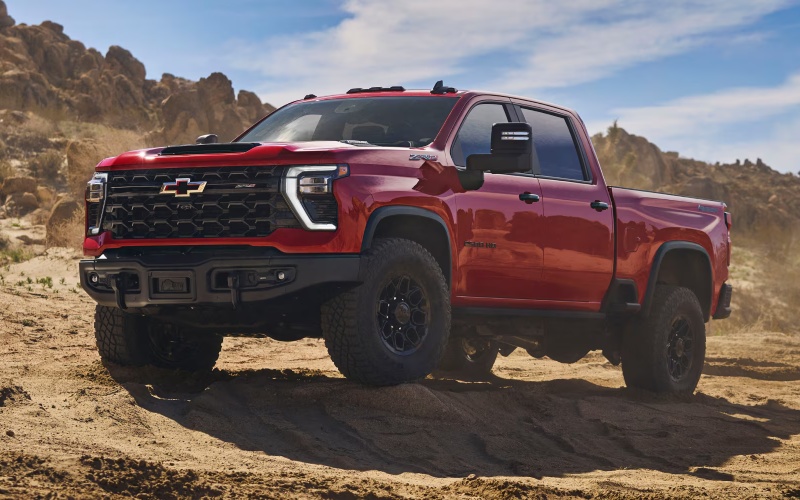
City Chevrolet Of Grayslake – How the In-Vehicle Trailering App on the 2026 Chevrolet Silverado 2500 HD Simplifies Hookups around Mundelein, IL
If you’ve ever backed up to a trailer alone and wished you had an extra set of eyes, the 2026 Chevrolet Silverado 2500 HD’s In-Vehicle Trailering App feels like a teammate riding shotgun. It brings your towing routine into one connected hub, helping you set up custom trailer profiles, run pre-departure checklists, test lights, and monitor critical details once you’re rolling. Around Mundelein, IL—where your day might start with a job site drop and end with a boat run to Diamond Lake—this kind of built-in support streamlines every hookup, from utility haulers to fifth-wheel campers and equipment trailers.
What separates the Silverado HD’s approach is how many tasks it consolidates and how well it pairs with the truck’s available camera views. Instead of juggling separate tools or manually tracking what you’ve already checked, the app guides you through a clear, repeatable process that helps you skip guesswork and keep moving. It’s an everyday time-saver that also builds confidence for occasional towers who want pro-level assurance.
What the In-Vehicle Trailering App Actually Does
Open the app on the available 13.4-inch diagonal touch-screen, and you’ll see the foundation of towing made simple: trailer profiles you can name, save, and recall. Each profile can include trailer type, parameters, and checklists tailored to that rig. The app walks you through steps many drivers do mentally—things like confirming tongue weight setup, verifying the coupler pin or fifth-wheel latch, checking safety chains, connecting brake controllers, and more. It even assists with trailer light tests, so you don’t need to ask someone to stand behind and call out what’s working.
- Create your trailer profile: Save type, length, and critical details so the truck “remembers” your setup every time.
- Customize checklists: Build a sequence that mirrors your routine—hitch latch, chains, breakaway cable, electrical, jack retraction, and pin locks.
- Run light diagnostics: The app helps you test running lights, brake lights, and turn signals with on-screen prompts.
- Monitor connections: Keep an eye on integrated trailer brake controller settings and reminders for maintenance intervals.
- Reference on the fly: Pull up your checklist anytime—handy when conditions or schedules change mid-day.
For crews who rotate between multiple trailers, saving profiles cuts setup friction dramatically. And for solo drivers, the guided light test is a game-changer—you can validate function without leaving the cab repeatedly.
Camera Views That Make It All Click
Where the Silverado HD really expands your field of vision is with up to 14 available camera views, including favorites like Hitch View (for precise alignment), Bed View (for fifth-wheel or gooseneck setups), and Transparent Trailer View for compatible trailers. Hitch View aligns the ball and coupler, letting you creep backward with clarity. Bed View supports accurate placement under a fifth-wheel, and Transparent Trailer View can show what’s behind you as though you can see through a compatible trailer—hugely helpful when changing lanes or merging.
These views don’t just make setup faster; they reduce stress during low-speed maneuvers around tight job sites, crowded marinas, and the narrow alleys behind local shops. Pair that with Trailer Side Blind Zone Alert and available HD Surround Vision, and you have an ecosystem that’s designed to pay attention from hookup to highway.
Gas or Diesel—The App Supports Your Choice
Whether you choose the standard 6.6L V8 gas engine or the available Duramax® 6.6L Turbo-Diesel V8, the In-Vehicle Trailering App provides the same clarity. The gas engine is a confident all-arounder for mixed driving, while the Duramax® turns torque into traction for heavy, frequent towing. Both are backed by a 10-speed automatic transmission for smooth control, and both benefit from the Silverado HD’s trailering tech—so your powertrain choice can hinge on your typical loads and routes rather than setup complexity.
For many Mundelein-area owners who tow equipment during the week and head to the Chain O’ Lakes on weekends, the ability to dial in unique settings per trailer eliminates the back-and-forth you used to accept as inevitable. Start the day with your equipment trailer profile, then switch to a boat trailer profile in the afternoon—each checklist is ready when you are.
Local Wins: How It Helps Around Mundelein, IL
Hookups near courthouse lots, along Route 60, or in tight residential streets can test your patience and your mirrors. The app and camera suite let you slow things down, see what you need to see, and validate your work without taking up extra space. It’s especially effective when you’re navigating crowded lots near schools or parks, or guiding a trailer into a garage or side yard with limited clearance.
Drivers managing deliveries and service calls across Mundelein, Vernon Hills, and Libertyville will also appreciate how the app’s checklists keep a consistent rhythm under pressure. When timelines tighten, having a structured process is exactly what reduces errors and keeps small details—like safety pin placement or trailer plug seating—from becoming big delays.
Pro Tips for First-Time Users
- Set up profiles ahead of time: Enter trailer info when you’re parked, so you’re ready to go at the site.
- Mirror your routine: Build checklists that reflect your normal sequence; you’ll adapt faster and trust it more.
- Pair with Hitch View: Use the camera alignment while you inch backward, then verify with a quick tug test.
- Save maintenance cues: Add reminders for tire checks, brake adjustments, and bearing service intervals.
- Review after your first trip: Tweak your checklist once you learn what you missed or what felt redundant.
Once your process is dialed in, you’ll move faster with fewer steps, and you won’t spend time re-doing what the app can help you get right the first time.
Frequently Asked Questions:
Do I need special trailer equipment to use the app?
Most features work with typical trailer hardware. For Transparent Trailer View, you’ll need a compatible trailer setup. Your advisor can walk you through specifics based on what you tow most.
Can I store multiple trailers?
Yes. You can create and save multiple profiles, each with its own data and checklist, so switching between rigs is straightforward.
Does the app replace a spotter?
It reduces the need for one by improving visibility and structure, but a spotter is always helpful in exceptionally tight conditions. The idea is to give you more independence and better precision.
How does it help with fifth-wheel or gooseneck setups?
Bed View and guided checklists simplify approach and coupling. You can verify pin and latch connection visually and consult your checklist to confirm the rest before moving.
Is it hard to learn?
Not at all. The interface uses plain-language prompts and intuitive steps. Most drivers feel comfortable after a single session of building their first trailer profile.
One final note: the Silverado HD pairs this smart software with the kind of hardware you expect in a heavy-duty truck—Durabed with high-strength steel, 12 standard tie-downs rated at 500 lbs per corner, and the available Multi-Flex Tailgate with six helpful configurations. It’s the right combination of brains and brawn for daily work and weekend plans.
If you want a quick demo tailored to your trailers, our team can set up a walkaround that mirrors your real-life towing scenarios on local streets and lots. It’s a hands-on way to see how the In-Vehicle Trailering App saves time and adds confidence when your day has no room for do-overs. City Chevrolet of Grayslake is serving Mundelein, Round Lake Beach, and Lake Villa with tools and guidance to make heavy-duty driving feel easier—and more precise—every time you hook up.
0 comment(s) so far on How the In-Vehicle Trailering App on the 2026 Chevrolet Silverado 2500 HD Simplifies Hookups around Mundelein, IL